Table of Contents (click to expand)
LCD screens ripple when you press them because pressing the screen physically disturbs the alignment of the liquid crystals inside the affected pixels. Each pixel relies on those crystals being twisted in a precise pattern to filter the right amount of red, green and blue light through; squash them and the polarisation gets scrambled, so you see rainbow-coloured ripples around the contact point until the crystals relax back into place. CRT and OLED screens have no liquid crystals and don’t show this effect.
To point out a location on a map or identify a person in a group photo to a friend, we invariably end up putting our fingers on the computer/laptop screen. While doing that, have you noticed that sometimes tiny ripples form around your fingers?
If your desktop/laptop screen shows those ‘ripples’ when you press a finger against it, it implies that you have an LCD screen. So-called ‘LED monitors’ are usually still LCDs underneath (with LED backlighting in place of an older fluorescent backlight), so they ripple too. CRT monitors have no liquid crystals at all, and modern OLED screens — common on flagship phones and high-end TVs — use self-emissive organic pixels rather than backlit liquid crystals, so neither one shows the ripple effect. However, before we get into this strange predilection of LCD screens, let’s have a quick look and do a quick background check on liquid crystals.
Recommended Video for you:
Liquid Crystals
The term ‘liquid crystals’ can be somewhat paradoxical; after all, how can something be solid and liquid at the same time? This thought pops up in our heads because we are so used to the idea of only three states of matter, namely solid, liquid and gas. However, that’s not so; in fact, there are not one or two, but many other states of matter. (For more information, check out How Many States of Matter Are There?). Liquid crystals are also a state of matter.
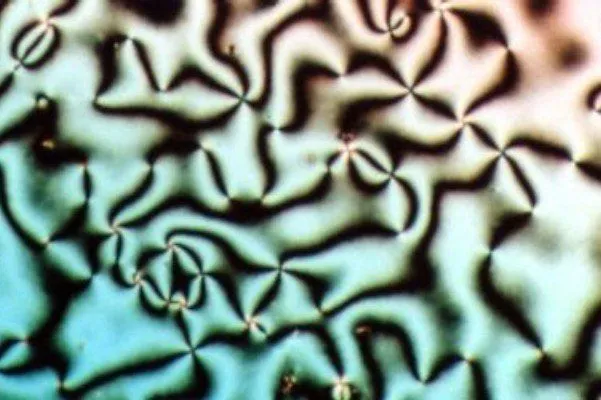
As their name suggests, they share their properties and characteristics with both solids and liquids. It is due to liquid crystals that televisions have transformed from being power-guzzling, beastly machines occupying one entire corner of a room to being light and portable enough to be hung on the wall, consuming only a fraction of what primitive televisions consumed to operate.
The characteristic of liquid crystals that makes them ideal to be used in display screens is that they align themselves when an external electric field is applied to them. To be more technically specific, these liquid crystals are sandwiched between two glass substrates that each carry a thin polarising filter (the polarisers, not the glass itself, are what filter the light). Light from a backlight — fluorescent in older monitors, LED in modern ones — falls on the first polariser and passes on to the liquid crystals.
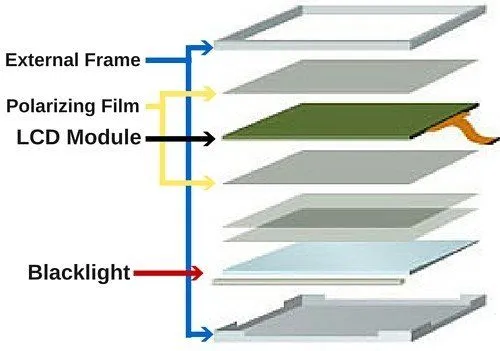
Now, these crystals align themselves in a way that allows varying levels of light to pass through and subsequently incident on the second piece of glass. The results of this process are the images that you see on the display screen. Note that liquid crystals don’t emit any light themselves; rather, they control whether light gets through them or not by aligning themselves in various patterns.
Pixels
A pixel (short for ‘picture element’) is the smallest point on an image. The higher the number of pixels, the more information is projected through them, meaning more sharpness and clarity of the image. Each LCD pixel consists of three sub-pixels — red, green and blue, one of each. Electric signals make the liquid crystals within each sub-pixel twist and align so they let the right amount of red, green or blue light through, mixing into the millions of colours you see on the screen.

Why Do LCD Screens Ripple?
Now that you know what liquid crystals are and how they align themselves to show different colors on a screen, let’s go back to the question posed in the title of this article. Under normal conditions, namely when your fingers are clicking away on the mouse rather than moving around on the screen, the alignment of liquid crystals is normal, and everything is alright.

However, the moment you put your finger on the screen (to identify the person standing fourth from the top left corner in the class photo, to your friend), you essentially disturb the alignment of the liquid crystals in those pixels. As a result, you see rainbow-colored ripples forming around the point where your fingers touch the screen, as the misaligned liquid crystals cause cells in the pixels to get confused about what colors they are supposed to display. The good thing, though, is that they return to their normal state as soon as you remove your finger.
We know that there are much more sophisticated ways of pointing things out on a computer monitor (like using the pointer of the mouse); yet somehow we invariably tend to poke at the screen with our fingers instead. This isn’t particularly wise, especially if you do it for long periods of time or with extreme force, as you can do permanent damage to the image quality of your screen! So be careful, and keep your fingers where they belong!